.png)

Using Call Center Reporting
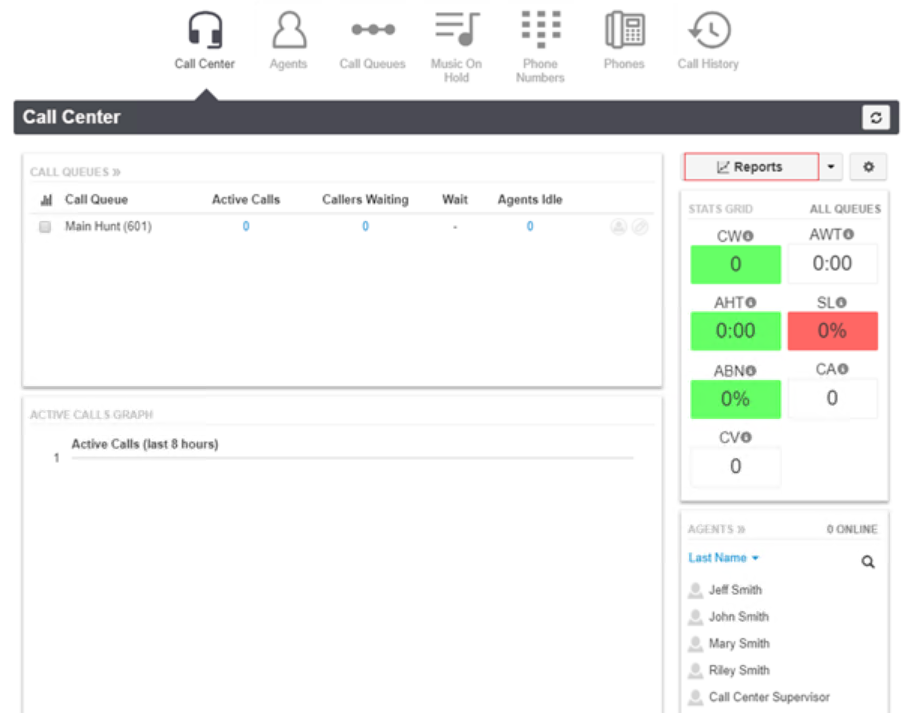
Stats Grid
- Green = value accepted.
- Yellow = value is within the range of your lower threshold.
- Red = value meets or exceeds your upper threshold.
- White = no thresholds are configured for the statistic.

Editing Stats Grid
- Click settings above the stats grid. The Call Center Settings page appears.
- Configure the Lower and Upper Thresholds for the statistics

- Click the General
- Use the Service Level Agreement slider to specify a value that will be used to calculate the statistic. This value determines whether a call was answered in an acceptable amount of time (seconds).
- Click Save.

Call Center Reports
- On the Call Center page, click the Reports tab
- Select date range
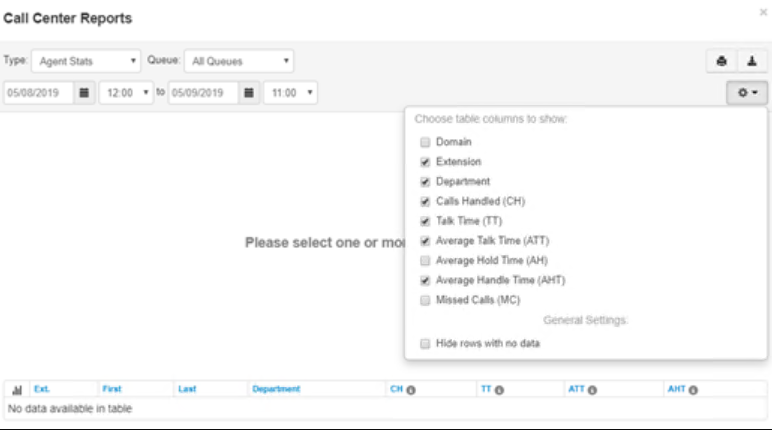
- Use Type drop-down and select type of report
Queue Stats: allows supervisors to view specific attributes on a queue-by-queue basis based on user-configurable attributes.
- The drop-down list shown below allows you to select the information that will appear on the report.

- Click the Table Settings gear to change the available configuration fields.

Agent Stats: shows various agent statistics over time.
Agent Availability: shows the availability of agents in the domain or in a department within a domain

DNIS (Dialed Number) Stats: DNIS is a telephone service that informs the receiver about a call that the caller dialed. The DNIS tells you which number was called.

Abandoned Calls: shows call center graphs for abandoned calls, organized by individual queues.
